
IPTV Player for Windows 11 and Windows 10
BLAZIN IPTV Player is a compact Windows IPTV player built for people who bring their own legal IPTV sources and want one desktop app for M3U, M3U Plus, Xtream Codes, STB MAC, Stalker Portal, EPG guide data, search, favorites, themes, and VLC-based playback.
Player-only app. No channels, playlists, streams, subscriptions, or copyrighted content are included.
Windows IPTV Source Support
One Windows IPTV player for the connection types people already use
Many IPTV users arrive with different login formats. Some have a simple M3U URL, some have a local M3U file, some have Xtream Codes credentials, and others rely on STB MAC or Stalker Portal details. BLAZIN IPTV Player is organized around those real-world formats so you do not have to rebuild your source around a limited player.
M3U and M3U Plus Player
Load playlist URLs or local files and keep Live TV, Movies, and Series organized when the source provides that information. M3U Plus gives richer categories and metadata on supported providers.
Xtream Codes Player
Use server URL, username, and password details from your legal provider. Xtream Codes sources often return cleaner category, movie, series, and guide data than a basic playlist URL.
STB MAC and Stalker Portal
Portal-style workflows are available for users whose provider relies on MAC/Stalker authentication. Advanced fields help with compatible providers that expect specific portal profile details.
EPG Guide Support
Browse program guide data where supplied by your playlist or provider. EPG support helps turn a channel list into a more useful desktop TV guide.
Internal VLC-Based Playback
Use the built-in player for a compact desktop setup, or configure external player workflows when your system needs a different playback path.
Small Windows Footprint
The interface is built for practical Windows use, including laptops and smaller screens where oversized media-center layouts can feel heavy.
27 Color Themes
Choose from 27 built-in themes and skins, including blue, brown, green, dark green, and other desktop-friendly color presets.
Compare Setup Options
Choose the Windows IPTV setup that matches your source
BLAZIN IPTV Player is built for users who already have a legal IPTV source and want a Windows app that can handle common playlist and portal formats in one place.
| Setup type | What you need | How BLAZIN IPTV Player helps |
|---|---|---|
| M3U / M3U Plus | A playlist file or playlist URL from your provider. | Loads user-provided playlists, categories, movies, series, and guide data where available. |
| Xtream Codes | Server URL, username, and password from your provider. | Organizes live TV, movies, series, categories, and EPG data when supplied by the source. |
| STB MAC | Portal URL and MAC details from your provider. | Supports compatible portal workflows for users whose provider requires MAC-based setup. |
| Stalker Portal | Portal information and compatible profile details. | Includes advanced Stalker settings for compatible legal providers. |
| Playback | Internal playback or an external player path. | Use the internal VLC-based player or configure an external player workflow when needed. |
Product Proof
See the Windows IPTV player interface before you install
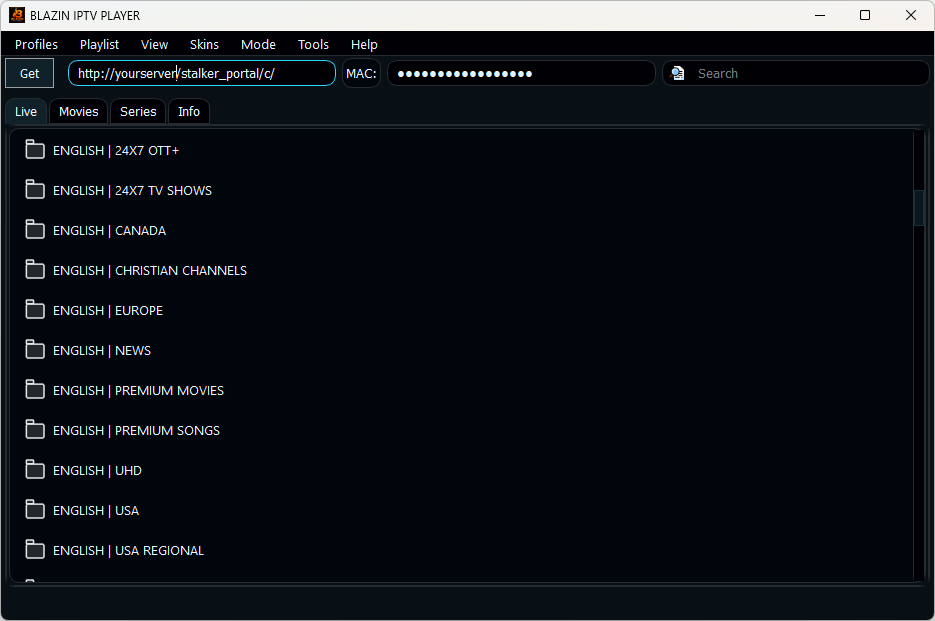
Live TV Playlist
Category browsing, search, favorites, and channel selection in a compact Windows interface.
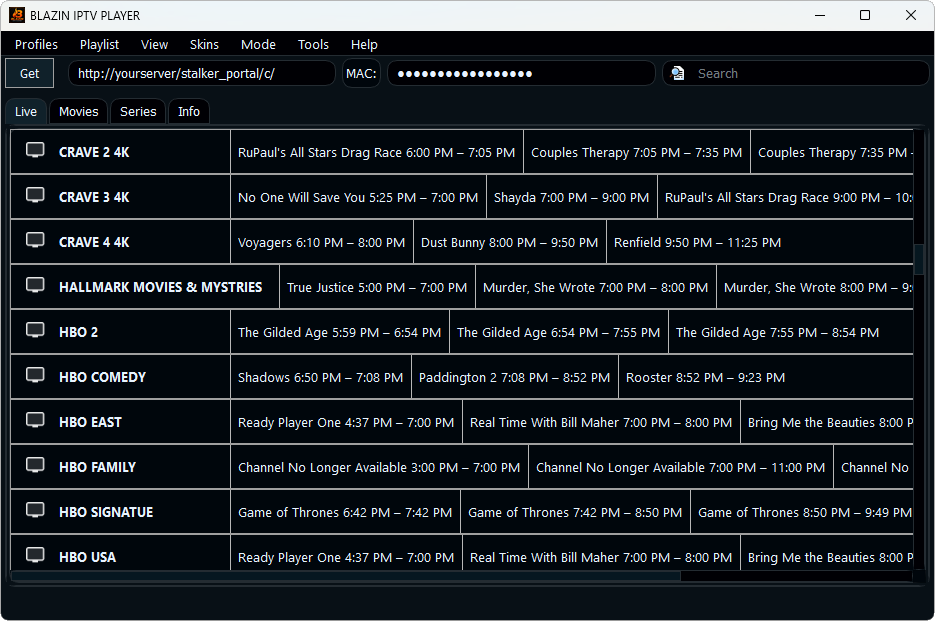
EPG Guide
Guide data where supported by the playlist or provider source.
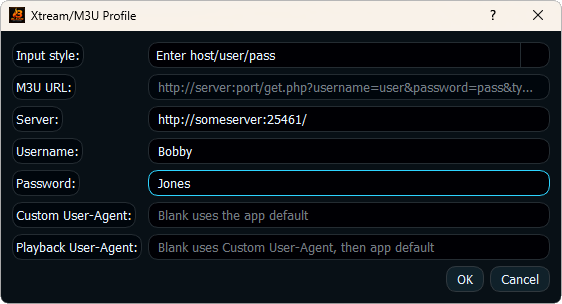
Xtream Codes Setup
Profile workflow for server URL, username, password, and user-provided source settings.
Setup Guides
Windows IPTV setup guides and app comparisons
M3U Player for Windows
Use playlist files and URLs with a Windows IPTV player built for legal user-provided sources.
Xtream Codes Player
Use server, username, and password details with categories, movies, series, and guide support where provided.
STB MAC Player
Use compatible portal workflows and MAC profile details when your legal provider requires that setup.
IPTV Player Zero Alternative
Review a Windows-first IPTV player with a 7-day trial and broad source support.
Best IPTV Player for Windows 11
Understand what to check before choosing a Windows IPTV app for playlists and portals.
Download and Trial
Start the 7-day free trial from the Microsoft Store and test the app with your own legal source.
FAQ
Frequently Asked Questions
Does BLAZIN IPTV Player include channels?
No. It is player-only software. You provide your own legal playlist, Xtream Codes account, STB MAC details, or Stalker Portal information.
Does the app have a free trial?
Yes. BLAZIN IPTV Player offers a 7-day free trial through the Microsoft Store so you can test the Windows IPTV workflow before deciding.
Which source types are supported?
The app is designed for M3U, M3U Plus, Xtream Codes, STB MAC, and Stalker Portal sources, depending on what your legal provider supports.
Does it support EPG guide data?
Yes. EPG support is included where the provider or playlist supplies compatible program guide data.
Why use a dedicated Windows IPTV player instead of a browser?
A dedicated desktop IPTV player can keep playlists, categories, favorites, EPG guide data, movies, series, internal playback, and external player options in one smaller Windows interface.
Can I use VLC with BLAZIN IPTV Player?
Yes. BLAZIN IPTV Player includes VLC-based internal playback and can also work with external players where configured.
7-Day Free Trial
Start Your 7-Day Free Trial on Windows
Install from the Microsoft Store, add your own legal playlist or portal details, and test the Windows IPTV workflow before deciding whether it fits your setup.
BLAZIN IPTV Player is player-only software. It does not provide channels, playlists, streams, provider accounts, or copyrighted content.